24 Hour TAT - Cut-off time 5 AM - Free Shipping On All DTF Orders Over $75

How to press DTF transfers using Cricut Easy Press step-by-step guide

How to Press a DTF Transfer Using a Cricut Easy Press?

Master the art of pressing DTF transfers with your Cricut Easy Press using our comprehensive step-by-step guide. Learn the optimal temperature settings (320°F), proper pressure techniques, and timing for professional results every time.

This guide covers everything from pre-pressing your garment to applying the transfer, peeling techniques, and finishing touches. Perfect for beginners and experienced crafters alike, these easy-to-follow instructions ensure your custom DTF heat transfers adhere perfectly to cotton, polyester, blends, and more.

Apply DTF Transfers with Cricut Easy Press in 3 Easy Steps

Follow these proven techniques to achieve professional results when pressing DTF transfers with your Cricut Easy Press. Proper temperature, timing, and pressure ensure your transfers adhere perfectly and last through countless washes.

STEP 1

STEP 1

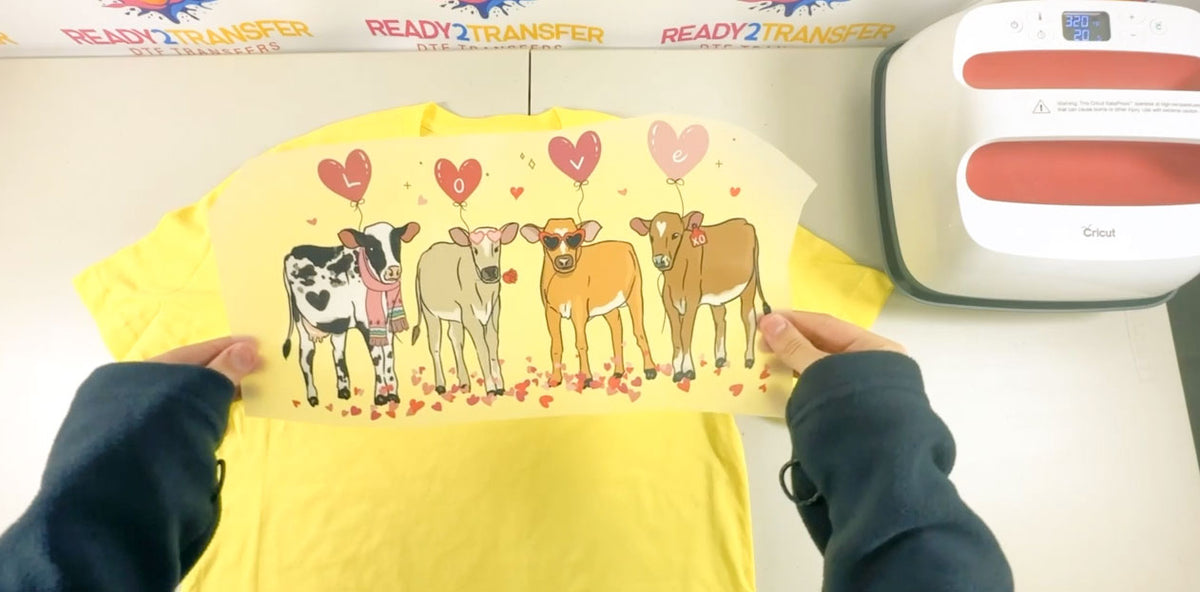
Pre-press your garment for 2-5 seconds at 300°F to remove moisture and wrinkles. Position the DTF transfer print-side down on the desired location. Set your Cricut Easy Press to 320°F (160°C) and allow it to fully preheat. Apply firm, even pressure across the entire transfer area for 15-20 seconds, ensuring complete contact between the transfer and fabric.

STEP 2

STEP 2

After pressing, wait 15-20 seconds for the transfer to cool slightly (warm peel method). This timing allows the adhesive to properly bond while the film is still pliable. Carefully lift one corner of the top protective film and peel it away slowly and evenly. If any part of the design lifts with the film, press that area again for 5-10 seconds and re-peel.

STEP 3

STEP 3

For a glossy, professional finish, place a Teflon sheet or heat-resistant cover over the design and press for an additional 7-10 seconds at 320°F with medium pressure. This finishing press locks in the adhesive and enhances durability. For a matte finish, use parchment paper instead of Teflon. This optional step ensures your DTF transfer withstands repeated washing and maintains its vibrant appearance.

STEP 1

STEP 1

Pre-press your garment for 2-5 seconds at 300°F to remove moisture and wrinkles. Position the DTF transfer print-side down on the desired location. Set your Cricut Easy Press to 320°F (160°C) and allow it to fully preheat. Apply firm, even pressure across the entire transfer area for 15-20 seconds, ensuring complete contact between the transfer and fabric.
STEP 2

STEP 2

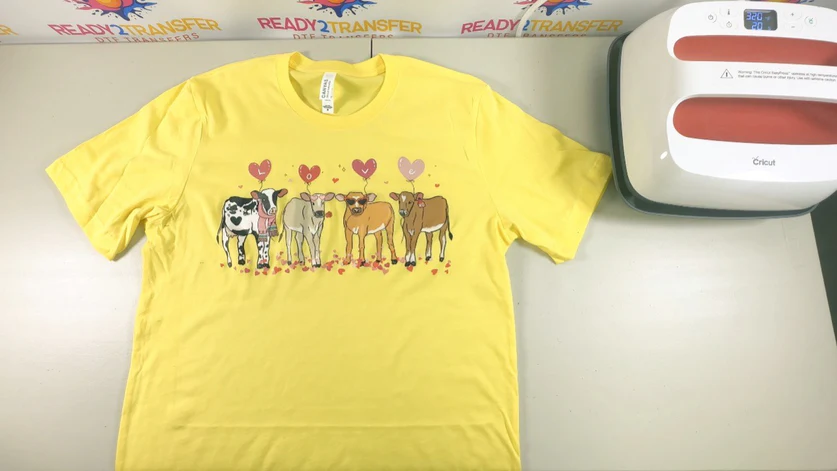
After pressing, wait 15-20 seconds for the transfer to cool slightly (warm peel method). This timing allows the adhesive to properly bond while the film is still pliable. Carefully lift one corner of the top protective film and peel it away slowly and evenly. If any part of the design lifts with the film, press that area again for 5-10 seconds and re-peel.

STEP 3

STEP 3

For a glossy, professional finish, place a Teflon sheet or heat-resistant cover over the design and press for an additional 7-10 seconds at 320°F with medium pressure. This finishing press locks in the adhesive and enhances durability. For a matte finish, use parchment paper instead of Teflon. This optional step ensures your DTF transfer withstands repeated washing and maintains its vibrant appearance.

Your Custom Shirt is Ready to Wear

With our premium DTF transfers and your Cricut Easy Press, create professional custom apparel in minutes. These durable, vibrant designs withstand repeated washing and maintain their color and clarity for years. Follow the 3-step process above, then wait 24 hours before the first wash for optimal adhesion. Always follow garment care instructions and wash inside out when possible to preserve your custom design.

Frequently Asked Questions

What is the best Cricut Easy Press model for DTF transfers?

All Cricut Easy Press models (Mini, 1, 2, and 3) work well with DTF transfers. The larger models (Easy Press 2 and 3) are ideal for bigger designs as they provide more consistent heat distribution. Choose based on your project size - the 9x9 inch Easy Press 2 or 12x10 inch Easy Press 3 work best for most DTF transfer applications.

Do I need to use a heat mat with Cricut Easy Press for DTF transfers?

Yes, using a heat-resistant mat or pad under your garment is essential when using Cricut Easy Press. The mat provides a firm, flat surface that ensures even pressure distribution and prevents heat from damaging your work surface. Cricut's Easy Press Mat or any heat-resistant pressing pad works perfectly.

Can I use Cricut Easy Press on stretchy or delicate fabrics?

Yes, but adjust your technique slightly. For stretchy fabrics like spandex blends, use slightly less pressure and ensure the fabric is flat and not stretched during pressing. For delicate fabrics like silk, reduce temperature to 300°F and use lighter pressure. Always test on a scrap piece first when working with new fabric types.

What temperature should I use on Cricut Easy Press for DTF transfers?

Set your Cricut Easy Press to 320°F (160°C) for DTF transfers. This temperature works best for most fabric types including cotton, polyester, and blends. Always pre-heat your Easy Press before applying the transfer for consistent results.

How long should I press DTF transfers with Cricut Easy Press?

Press DTF transfers for 15-20 seconds with medium to hard pressure using your Cricut Easy Press. Apply even pressure across the entire transfer area. For best results, wait 15-20 seconds after pressing before peeling the top layer.

Do I need to pre-press the garment before applying DTF transfers?

Yes! Pre-press your garment for 2-5 seconds at 300°F to remove moisture and wrinkles. This ensures a smooth surface and better adhesion of your DTF transfer. Always work on a clean, flat surface for best results.

Should I peel DTF transfers hot or cold with Cricut Easy Press?

For Cricut Easy Press applications, wait 15-20 seconds after pressing, then peel while warm (not hot). This timing ensures the adhesive has properly bonded while still allowing for easy removal of the top film layer.

Can I use Cricut Easy Press for different fabric types?

Yes! Cricut Easy Press works great with DTF transfers on cotton, polyester, blends, denim, and more. Adjust pressure slightly for delicate fabrics, but the 320°F temperature setting works well for most materials.

What's the difference between using Cricut Easy Press and a heat press machine?

Cricut Easy Press is more portable and user-friendly, perfect for home use and small projects. Professional heat press machines offer larger platen sizes and more consistent pressure for bulk production. Both work excellently with DTF transfers when used correctly.

Do I need a finishing press after applying DTF transfers with Cricut Easy Press?

For a shiny finish, cover the transfer with Teflon and press for another 7-10 seconds at 320°F. For a matte finish, use parchment paper. This finishing step is optional but recommended for extra durability and professional appearance.

What if my DTF transfer doesn't stick properly with Cricut Easy Press?

If your DTF transfer doesn't stick, check that you're using the correct temperature (320°F), applying enough pressure, and pressing for the full 15-20 seconds. Ensure the garment is clean, dry, and pre-pressed. Increase pressure if needed, but avoid overheating.

Can I use Cricut Easy Press for bulk DTF transfer applications?

Yes, Cricut Easy Press can handle multiple DTF transfers, though it's best suited for small to medium batches. For large-scale production, a professional heat press machine may be more efficient. The Easy Press is perfect for custom projects, small businesses, and personal use.